PDF to QR code
Upload your PDF and get a QR code that opens the PDF when scanned.
Upload your PDF and get a QR code to share. 100% free!
How to create a QR code for a PDF
Every PDF you upload to PDF Deck gets a QR code automatically - no separate generator, no design tool, no fiddling with error-correction levels.
- Upload your PDF above. You'll land on the PDF's settings page.
- From your dashboard, click QR code on the document.
- Click Download QR and drop it into your design, poster, or print layout.
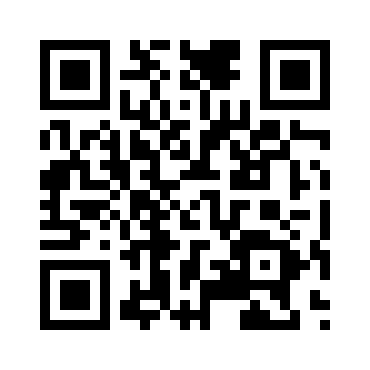
Try scanning this one with your phone - it opens the sample PDF right in the browser:
Why use a QR code for a PDF
A QR code is the bridge between the physical world and your PDF. If the PDF has to reach someone who isn't sitting at a keyboard, a QR beats a typed URL every time.
It's also a stable bridge. Because the QR encodes a PDF Deck share link and not the file itself, you can update the PDF without reprinting the QR. The poster you printed last month still points to the latest document.
Where PDF QR codes come in handy
- Events and conferences - programmes, maps, speaker bios on lanyards and posters.
- Restaurants and cafés - menus that can be updated without reprinting.
- Trade shows and booths - spec sheets and catalogues without handing out flyers.
- Real estate - brochures on "for sale" signs and window cards.
- Museums and galleries - exhibit guides and audio transcripts next to each work.
- Business cards and packaging - a portfolio or product sheet one scan away.
- Classrooms - handouts that students can pull up on their phones.
What you get
- A high-resolution PNG suitable for print.
- A QR that updates automatically if you change the document's slug or custom domain.
- The same view tracking as any share link, so you can tell the QR is getting scanned.
- Optional password protection on the underlying PDF.
Is the QR really free?
Yes. Every uploaded PDF gets a QR code at no cost. Paid plans exist for people who need more documents, larger files, a custom domain, or to remove the PDF Deck branding. See pricing.
Upload a PDF above to generate yours, and let us know what you think.
- Host your PDF and share it as a link
-
Upload a PDF and share it as a link that you can update without needing to share again.
- Embed a PDF on your website
-
Embed a PDF on your site so people can view it without downloading it or opening a link.
- Share your PDF with a QR code
-
Share your PDF as a QR code to make it easy for people to view your PDF.
- Share your PDF as a flipbook
-
Share your PDF as a flipbook or in presentation mode for a richer reading experience.
- Password protect your PDF
-
Require a password before anyone can view your PDF. Secure, simple, and unlocks per viewer.
Not just PDFs — share a Word document, PowerPoint, or Excel spreadsheet as a link too.